Four thousand photos. That is a fairly ordinary first year on a modern phone, and it works out at eleven pictures a day of a person who spent most of that year asleep. Nobody scrolls four thousand photos. Nobody scrolls four hundred.
A book of sixty gets picked up constantly. That is the whole argument for making one, and most baby photo book ideas come down to a single skill, which is deciding what to leave out.
Why does a photo book beat the camera roll?
- It has an end. A finite object gets finished. A camera roll gets deferred.
- It gets handled. Toddlers point at themselves in books. Grandparents show books to visitors. Nobody hands a phone round the table.
- It survives. Phones get lost, accounts lapse, formats change. A printed book sits on a shelf and asks nothing of anyone.
- Editing is the memory. Choosing sixty photos out of four thousand forces you to decide what the year was actually about, and that decision is worth more than the extra 3,940 files.
If your library is a mess before you start, spend twenty minutes on the sorting method in our organizing baby photos post. Selecting is much faster from a tidy album than from an endless scroll.
Which baby photo book structure should you choose?
| Structure | How it runs | Best for | The catch |
|---|---|---|---|
| Month by month | One spread per month, twelve chapters | First-time parents, and anyone already shooting monthly milestone photos | Quiet months look thin next to holidays |
| One photo a week | 52 images, four to a spread, in order | Showing physical change; it reads like an animation | You have to keep up, or backfill from dates later |
| Themed chapters | Sleep, bath, food, outdoors, people who held them | Second and third babies, whose year is less tidy | Loses the sense of time passing unless you date the captions |
| A "firsts" book | First bath, first smile, first food, first steps | A short, giftable book that grandparents love | Some firsts were never photographed. Write those in instead |
Mixing two of these is usually a mistake. Pick one spine and let it carry the whole book. Two spines is just a scrapbook. My own preference is month by month for a first baby, because it maps onto the way you already talk about the year, and themed chapters for a second, because nobody photographs a second baby on a schedule.
How many photos should go on each spread?
Fewer than feels right. A two-page spread holds one large image and one small one very comfortably. Push to six and the eye stops looking at any of them.
- One hero per spread. Pick the best frame from that month and let it run full page. Everything else supports it.
- Two to four images on the opposite page, at most, with white space between them.
- Group the burst, keep one. If you shot twelve frames of the same yawn, one of them goes in the book.
- Let a page be nearly empty. A single small photo of a hand on a blanket, alone on a white page, will stop people every time.
- Aim for 40 to 70 photos in a first-year book. More than that and the object gets heavy and the good pictures get buried.
Include the unglamorous frames too. The 3am feeding chair, the mountain of laundry, the stroller in the hallway. Our post on everyday baby photos makes the case for those better than a book of posed portraits ever could.
Captions worth reading later
Most photo book captions say "6 months" and stop, which the photo already told us. The caption's job is the part the camera could not record.
- Write what happened just outside the frame. "Ten seconds after this she grabbed the cup and poured it down her front."
- Record sounds and smells. The particular grunt before waking. The smell of the top of the head. None of that is in the file.
- Name the people and the places. In thirty years, "Auntie Rae's kitchen, Leeds, March" is worth more than any adjective.
- Keep it short and specific. Two sentences maximum. Detail beats sentiment.
- Date things properly. Month and year at minimum, since faces blur together fast.
The photographs will still be here in thirty years. The context will not. Write down the small facts while they are still boring to you, because boring is exactly what makes them precious later.
When should you make your baby photo book?
Waiting until the first birthday is how these books never get made. By then you are planning a party and the year is a blur.
- Choose photos monthly. On the same day each month, move five or six favorites into a dedicated album. Five minutes, twelve times.
- Write the caption then, while you still remember why the photo mattered.
- Build the book at month ten. Leave the last two spreads open.
- Order two copies. One for you, one for grandparents (three, if there are two sets of grandparents), since the extra copy costs far less than starting again in a year.
Our baby milestone photos guide and the monthly baby picture ideas post both set out a repeatable monthly shot, which makes the month-by-month structure almost self-assembling.
Resolution, and what it means on a page
Book printing uses the same 300 DPI standard as photo prints. Divide pixel dimensions by 300 to get the largest clean size. A file at 2048×2560 comes out at roughly 6.8 by 8.5 inches, which covers a full page in most standard books and every smaller placement in the layout.
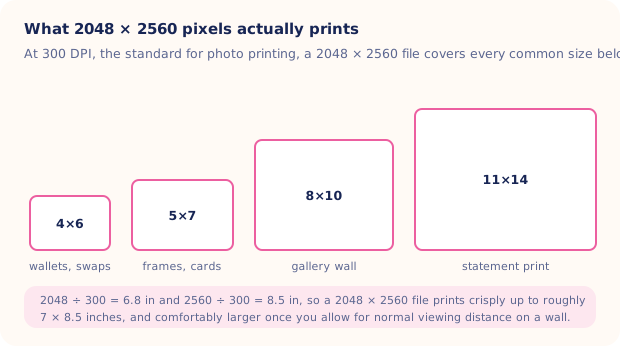
Reading across the diagram, the largest box is the one to watch. Anything you plan to run across a full spread in a big landscape book is pushing past what a single phone file comfortably covers, so save those slots for your sharpest, best-lit originals. Screenshots, heavily cropped frames and images saved from messaging apps are the usual culprits behind a soft page. Most book software flags low-resolution placements with a small warning triangle; take it seriously rather than clicking through. The same maths is unpacked in our guide to printing baby photos.
Filling the gaps you never photographed
Every first year has holes. The week nobody picked up a camera, the newborn stretch where every photo was taken in a dark hospital room, the month that exists only as blurry video stills. Totti can turn one clear photo of your baby into a studio-style portrait, keeping their real facial features while rebuilding the background, lighting and outfit, which is enough to give a chapter opener a printable image in a month where the only surviving frames were shot under a hospital light at 2am and none of them were ever going to hold up at full page size.

Chapter openers from ordinary snapshots
50+ templates, "Hello World" and monthly milestone cards with wooden plaques, and HD export at 2048×2560 for full-page book placements. Free to download, iOS 17 or later.
Get Totti on the App StoreWhichever structure you choose, finish it. An imperfect book on the shelf beats a perfect one still sitting in a browser tab, and the only version your child will ever care about is the one they can actually pick up.