What if you took the picture first and built the studio afterwards? An AI newborn photoshoot runs in exactly that order. The ordinary phone picture comes first, and the scene gets built around it after the fact. You upload one clear snapshot of your baby, choose a template, and the app regenerates the background, lighting, outfit and styling while keeping your baby's actual facial features untouched.
So yes, the baby in the finished portrait is genuinely your baby, same face, same tiny nose, same expression, placed in a studio-quality scene. No session fee, no travel, no waking a sleeping newborn for a costume change. The rest of this guide covers how it works, what it can and can't do, and how to try it with Totti in about two minutes.
What is an AI newborn photoshoot?
It's a photo transformation, not a photo invention. That distinction matters, because "AI baby" apps come in two very different flavors. Face-mixer novelty apps imagine what a future baby might look like. An AI newborn photoshoot app like Totti does the opposite. It starts from a real photo of your real baby and restyles everything around them, the way a whole studio team would in a traditional session, from the stylist's outfit choices to the retoucher's final pass.
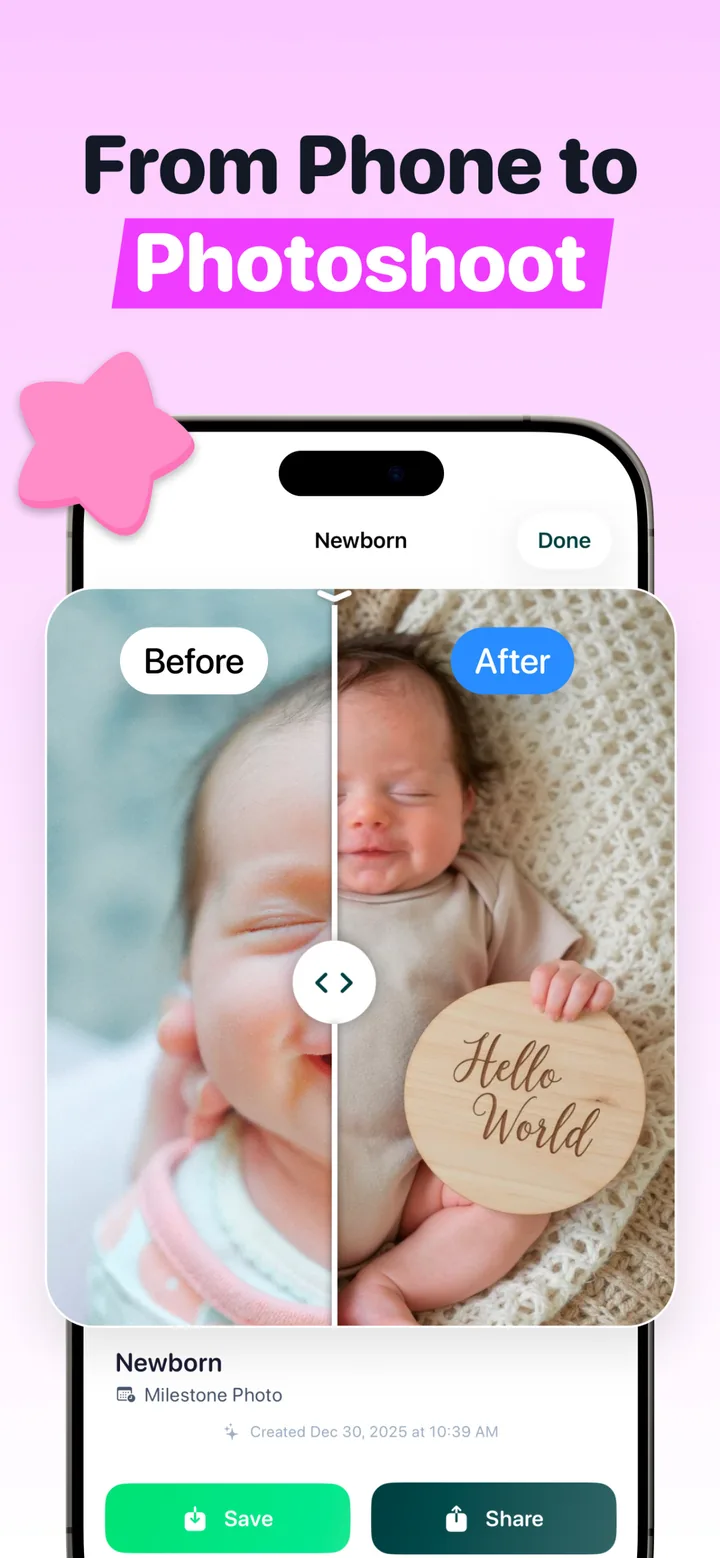
You end up with the kind of portrait you'd normally book a studio for, whether that's a curled newborn on a knit blanket, a "Hello World" milestone card or a classic plain-backdrop pose. In a real studio those curled and propped looks are the demanding ones. Newborn safety guidelines for photographers are clear that a baby is never left unsupported for them, and that the most dramatic versions are composited from two frames where an adult's hands were holding the baby the whole time. If you've been comparing that route against what a newborn photoshoot costs in 2026, this is the third option most parents don't know exists.
How does an AI newborn photoshoot work, step by step?
- Upload one snapshot. A clear, well-lit phone photo with your baby's face visible. A nap-time picture by a window is perfect. You don't need a posed shot; a simple back-lying photo gives the AI plenty to work with.
- Pick a template. Totti has 50+ scenes across Classic, Cozy and Outdoor categories, plus seasonal collections (Christmas, Halloween, Easter). Newborn-specific templates include the Potato Sack Pose, Curled Taco Pose and Sweet Slumber.
- Choose the styling. Virtual outfits (cozy knits, floral rompers, holiday wear, studio attire) are matched to each scene, and there's a boy/girl setting for the finished look.
- The AI restyles the scene. The background, lighting, wardrobe and props are all regenerated to match the template, while your baby's facial features stay exactly as they were in the original photo. That last part is what makes the rest work.
- Compare and export. A built-in before/after slider shows the original next to the portrait, and you can export in HD at 2048×2560, sharp enough for prints and framed wall art.
Do AI newborn photos look real?
When the source photo is decent, yes, and the before/after slider is the proof. The app never redraws your baby's face, so everyone who loves this baby recognizes them instantly, which is the only test that really counts. What changes is everything a studio would change, meaning light quality, backdrop, wardrobe and props. That's exactly the part phone snapshots get wrong.
The face in the portrait comes from your photo, not from the AI's imagination. The AI's job is the set design — your baby's job is just to be the baby.
| Element | What happens in the AI photoshoot |
|---|---|
| Face & features | Preserved from your original photo |
| Background | Replaced with the template scene (studio, garden, holiday set) |
| Lighting | Regraded to soft, even studio light |
| Outfit | Swapped for a virtual outfit matched to the scene |
| Pose & props | Staged to match the template; no physical posing needed |
Try an AI newborn photoshoot free
Totti is free to download on iPhone and iPad (iOS 17+). Upload one snapshot, pick from 50+ templates, check the before/after slider, and export your favorite in HD 2048×2560.
Get Totti on the App StoreWhat an AI newborn photoshoot can't do
- It can't fix an unusable source photo. If the face is heavily blurred, in deep shadow or mostly covered, the AI has nothing to preserve. One sharp, front-lit photo is all it needs; our guide shows how to take that photo at home in fifteen minutes.
- It works best with one baby per portrait. The portrait templates are designed around a single star of the show.
- It won't replace candid family moments. Keep taking the messy, real-life photos too. Dad asleep on the couch with the baby is a memory no template covers.
- It's a portrait tool, not a keepsake of an experience. If the studio day itself matters to you, AI complements it rather than replaces it.
Parents also reasonably ask about privacy and whether uploading baby photos is wise at all, so we've written a straightforward take on whether AI baby photography is safe.
Getting the best result from your upload
The AI is only as good as the photo you hand it, though the bar sits lower than most parents expect. One sharp frame beats a hundred mediocre ones. A few habits that consistently improve the output:
- Daylight over lamplight. Window light keeps newborn skin tones true, which helps the AI blend your baby cleanly into the new scene.
- Fill the frame with the face. Shoot from straight-on or slightly above, close enough that features are crisp.
- Skip filters on the source photo. Upload the unedited original, because beauty filters distort exactly the features you want preserved.
- Take a few options. Eyes-closed and eyes-open source photos give you two different moods of portrait from the same session.
Your first AI newborn photoshoot with Totti
- Download Totti free from the App Store and set up your baby's profile. The app tracks each baby's journey and photo history separately.
- Upload a clear snapshot with the face visible, in daylight if possible, straight-on or slightly above.
- Browse templates and pick a scene, maybe Sweet Slumber for a classic sleeper look, or a "Hello World" milestone card if you're announcing.
- Generate, then drag the before/after slider to compare against your original.
- Add a frame if you like (Polaroid, Vintage, Wood, Gold or Floral), then export in HD.
From there, the same portrait works everywhere, from birth announcements and holiday cards to the grandparents' group chat and the nursery wall. One snapshot in, a full photoshoot out. That's the whole idea.