You're running on two hours of sleep, the family group chat is vibrating, and everyone wants the picture. Good birth announcement photos need three things: your baby's face clearly visible, a clean simple background, and room for the details (name, date, weight, length). One good frame is enough. A photographer is not required. Neither is leaving the couch.
This guide covers what makes an announcement photo work, exactly what information to include, when to send it, print versus digital, and the fastest route from "blurry hospital snapshot" to a card-ready portrait.
What makes a great birth announcement photo?
- The face is the photo. Fill the frame with your baby; announcements get viewed at phone-screen size, so tight and clear beats artistic and distant.
- Simple, uncluttered background. A plain blanket or wrap. Hospital-room clutter, laundry piles and busy prints all fight the star of the show.
- Soft, even light. Indirect window light flatters newborn skin; flash and overhead lights create harsh shadows and yellow tones.
- A calm baby. Asleep is perfect, since the classic curled newborn look only happens in deep sleep anyway.
- Space for text. If you'll overlay the name and stats, leave some quiet space in the frame, or use a milestone-card layout that builds the text in.
What should you write on a birth announcement?
The classic announcement answers the questions everyone asks first:
- Full name. The headline. Middle name included if you're proud of it (you are).
- Birth date. Plus the time, if you like the detail.
- Weight and length. The stats grandparents quote for years.
- A short line from you. "We're so in love" does more than a paragraph ever will. Need inspiration? Our baby announcement captions post has dozens of ready-to-use lines, and these "Hello World" sign ideas show how to work the details into the photo itself.
Two extras are worth a thought. If the name has a pronunciation nobody will guess, a short phonetic line saves you twenty replies asking. And naming older siblings ("joins big sister Noor") matters far more to them later than it does to anyone else now.
Five announcement photo ideas that always work
- The sleeping close-up. Baby asleep on a neutral blanket, shot from above, face filling the frame. The all-time classic because it always works.
- The "Hello World" card. Baby beside a plaque or card carrying the name and birth stats, so the photo is the announcement, no graphic design required.
- The detail trio. Tiny feet, curled fingers, eyelashes. Beautiful as a supporting collage around the main portrait.
- The scale shot. Baby's hand wrapped around a parent's finger, which instantly communicates just how small they are.
- The family frame. Parents' hands cradling the baby, faces optional. Works even when nobody else feels camera-ready, which in week one is everybody.
When should you send birth announcement photos?
There's no rule. There's only your energy level. Most families share a quick digital announcement within the first week, then send printed cards within four to six weeks, often using a nicer photo taken once everyone has settled in. Newborns hold that curled, sleepy look best in days 5–14, which is the sweet spot for the classic pose; our post on when to take newborn photos goes deeper on timing.
If printed cards need to land by a particular date, work backwards from it rather than forwards from today. Printers count turnaround from the moment you approve the proof, not from the moment you upload, and the proof round trip is where the extra days go.
Nobody remembers whether your announcement arrived in week one or week six. They remember the photo. Optimize for one great picture, not for speed.
Print vs. digital announcements
The two formats fail differently. A slightly soft shot still passes on a phone screen. The same file on a 5×7 card comes back visibly fuzzy, and nothing can be done once the box arrives.
| Digital (text/social) | Printed card | |
|---|---|---|
| Speed | Same day | 1–3 weeks with printing/shipping |
| Cost | Free | Roughly $1–$3 per card plus postage |
| Reach | Everyone, instantly | The mantel-and-fridge crowd |
| Keepsake value | Scrolls away | Kept for decades |
| Photo requirement | Any decent shot | Sharp, high-resolution portrait |
Most families do both, a fast digital share now and printed cards later. Which means the photo needs to survive both a phone screen and a 5×7 print. That's where resolution and clean styling start to matter.
How do you get birth announcement photos without a photographer?
The week you need this photo is the week you're least equipped to stage a photoshoot. So let AI do the studio work. Take one clear snapshot of your baby, or pick the best one already on your phone, and Totti rebuilds the scene around them, generating backdrop, lighting, wardrobe and styling while preserving your baby's real facial features.
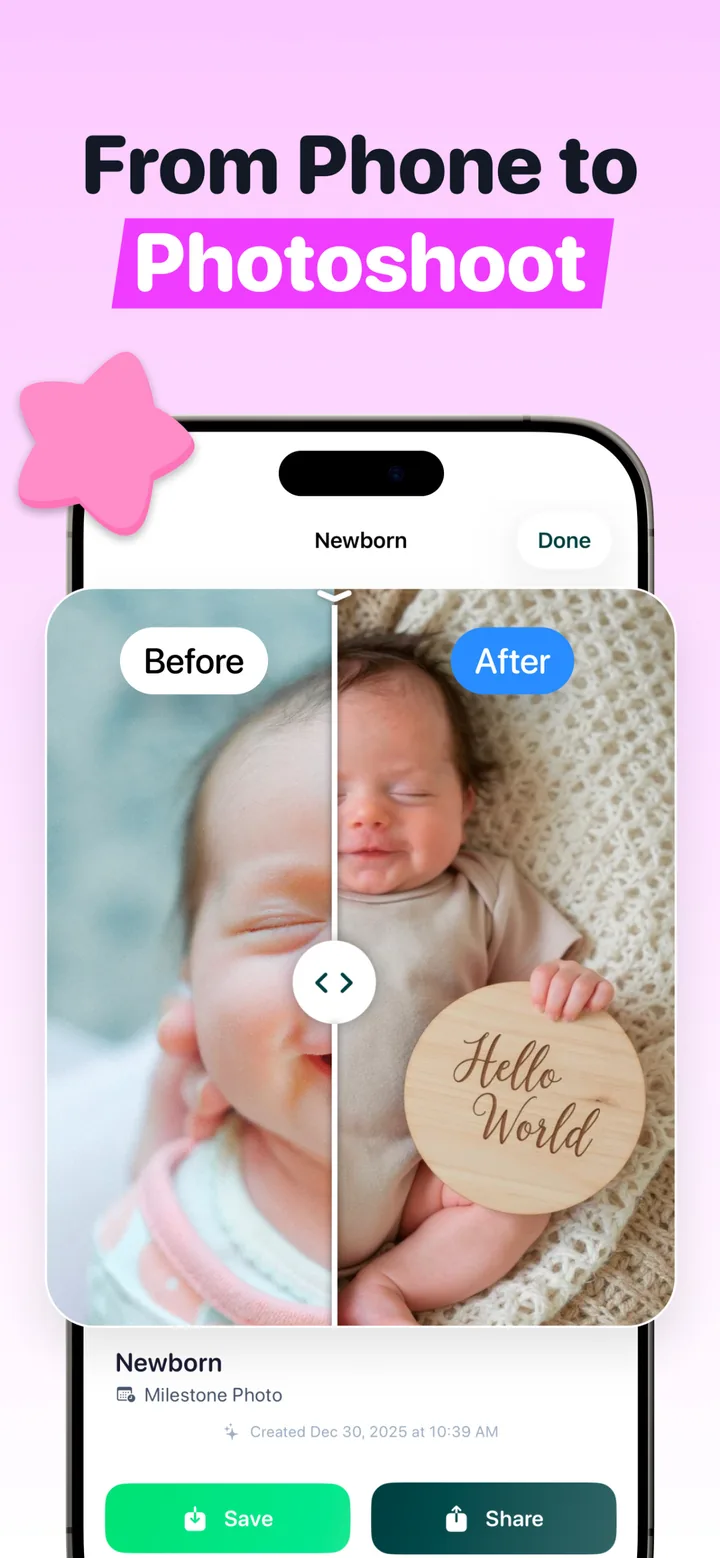
The "Hello World" milestone card is practically purpose-built for announcements. Your baby is styled on a soft knit blanket with an elegant wooden plaque, in a layout that already says "announcement" before you add a single word. From there, export in HD at 2048×2560, which is more than enough resolution for standard announcement cards, and share the original-vs-portrait comparison if you want to blow up the group chat twice.

Announcement-ready in minutes
Upload one snapshot, choose the "Hello World" milestone style, and export a studio-quality announcement portrait in HD (2048×2560), from the hospital bed or your couch. Free to download on iPhone.
Get Totti on the App StoreQuick checklist before you hit send
- Name spelled correctly: check it twice, then have someone else check it.
- Date, weight and length accurate (the hospital paperwork is your source of truth).
- Photo sharp at full size; zoom in on the face before printing.
- Everyone who should hear it personally has heard it before the public post.
And for a nicer source photo than the ones currently on your phone, a ten-minute window-light session is all it takes. Our newborn photoshoot at home guide walks through the whole setup with just a blanket and a phone.