Twelve photos, taken the same way twelve times. That's what baby milestone photos come down to, and what carries you through is a system, not inspiration. Pick a handful of milestones you'll actually keep up with, shoot them the same way every time, and by the first birthday you'll have a matching series that shows exactly how much your baby grew. Miss the system part and you get what most parents get. An amazing week one, a decent month two, and a guilty scramble in month nine.
The full plan below covers which milestones to capture, how to keep every photo consistent, what to write on the cards, and how Totti automates the parts that usually fall apart.
Which baby milestone photos should you capture?
You don't need all of these. Pick one cadence (most parents choose monthly) plus the two anchor moments, newborn and first birthday.
- "Hello World" (days 1–14). The newborn announcement shot: name, birth date, and one impossibly small human. This is the photo grandparents frame. Need caption inspiration? See our Hello World sign ideas.
- Weekly (weeks 1–12, optional). Newborns change fast, and weekly shots in the first three months capture the cheeks filling in, the eyes opening wider, the first real smiles. After week 12, switch to monthly.
- Monthly (months 1–12). The classic series. Same setup every month, one card showing the age, done in ten minutes. Our monthly baby picture ideas post has 20+ theme variations for anyone bored of the standard.
- Yearly (birthdays). The series graduates to an annual tradition, and the first birthday photoshoot is the big one, cake smash optional.
- Firsts, as they happen. First bath, first food, first steps. These don't need styling. Just capture them.
How do you keep a milestone photo series consistent?
A milestone series is really one photo taken twelve times. The magic at month twelve comes entirely from what stayed the same while the baby changed. Lock in these four things at month one:
- Same spot. One corner of one room. Mark the blanket position with painter's tape if you have to (nobody has ever regretted the tape).
- Same light. Same window, same rough time of day. Soft indirect daylight, no flash, no overhead lights.
- Same prop. One blanket plus one age marker (card, wooden plaque, or numbered onesie). A stuffed animal in every frame doubles as a brilliant size reference as your baby outgrows it.
- Same angle. Straight down from above for back-lying months; straight-on once your baby sits.
The month-nine photo you take tired, in the wrong light, with a different blanket? That's the one that will bug you in the collage forever. Consistency beats creativity in milestone photography.
What should you write on a milestone card?
Keep wording short. The card is a caption, not a diary. Formulas that work:
- The classic: "Three months" / "12 weeks", clean and timeless.
- The announcement: "Hello World — Liyana · June 12 · 7 lb 4 oz".
- The personality line: "Month 5: discovered feet. Obsessed."
- The stats card: age, weight, current obsession, current nemesis (usually the car seat).
- The countdown flip: in month 11, "1 month until cake".
Whatever the wording, size it for a phone screen. A card that reads beautifully in your hands turns to mush at thumbnail size in a group chat, so use a few words in a high-contrast font. And decide early whether you are counting weeks or months, because switching partway leaves a series nobody can read back in order.
What to do with the finished series
Milestone photos earn their keep when they're seen, so plan the destination early:
- The 12-month collage. The classic first-birthday grid, twelve matching frames around one visibly growing baby. This is why consistency matters.
- A printed frame that updates monthly. One spot on the wall or the grandparents' shelf where the newest milestone photo lives.
- Monthly texts to family. A matching milestone card every month beats a random camera-roll dump, and doubles as a caption-ready social post.
- The keepsake album. One page per month plus the firsts. Future-you will be very grateful.
Choose the destination around month two rather than month twelve. A collage wants every frame cropped the same way and an album wants a single orientation, and both are far easier to feed if you knew that from the start.
How Totti automates the whole system
Everything above assumes you'll remember the shoot, keep the props findable, and match the styling for twelve straight months. Totti makes the consistency automatic and generates the styling instead.
- Milestone cards built in. "Hello World", weekly, monthly and yearly cards with elegant wooden-plaque styling, so there's nothing to buy, print or hand-letter. Upload any recent snapshot and the card, backdrop and styling are generated around your baby.
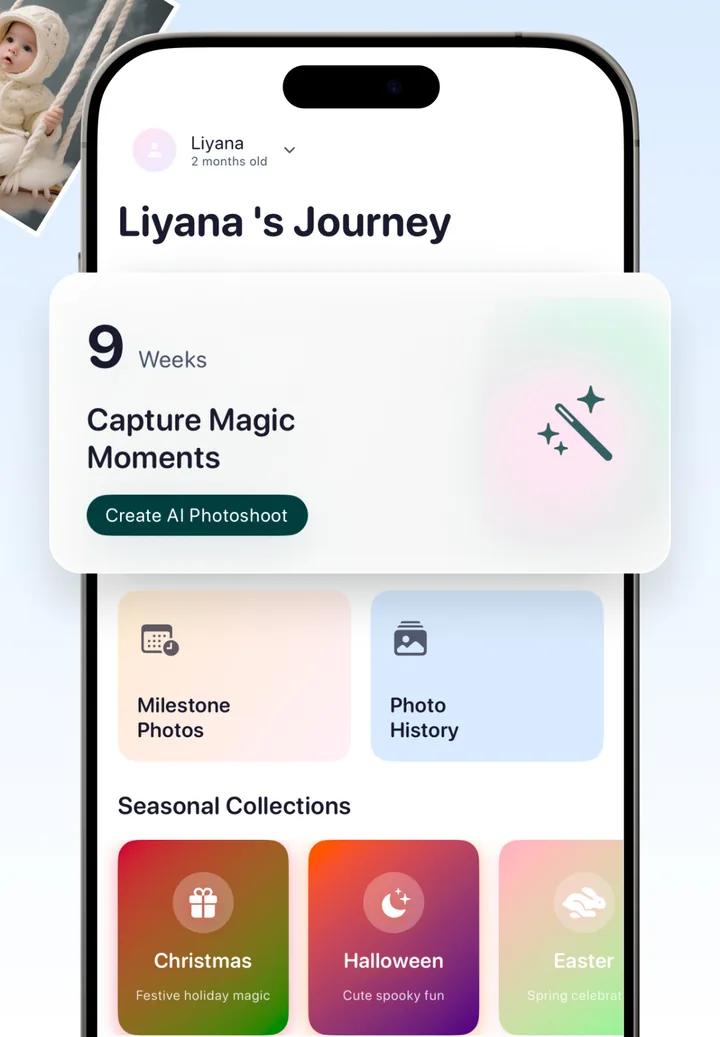
- Per-baby journey tracking. The app tracks each baby's age and shows the current milestone (say, "9 Weeks") right on the home screen, with your full photo history in one place, so week 23 doesn't quietly slip past you.
Will month 3 and month 9 actually match?
- Perfect consistency, by design. Because the AI regenerates background, lighting and styling from a template while preserving your baby's real features, month 3 and month 9 match exactly, even if one was shot by the window and the other in a dim hotel room.
- Seasonal collections. Christmas, Halloween and Easter templates cover the holiday editions of the series without a single prop purchase.
Every export also lands at the same 2048×2560, so the twelve finished frames drop into a collage or a printed grid at identical size, with no single month needing a different crop to fit.

Milestone photos on autopilot
Set up your baby's profile once. Totti tracks the journey, offers the right milestone card at the right age, and turns any snapshot into a matching studio-style portrait, ready to export in HD 2048×2560. Free on iPhone.
Get Totti on the App StoreManual system vs. Totti: honest comparison
| Manual milestone system | With Totti | |
|---|---|---|
| Remembering the date | Calendar reminders (that get snoozed) | Journey tracker shows the current milestone |
| Props & cards | Buy, store, find every month | Milestone cards generated in-app |
| Matching styling | Same spot, light and prop for 12 months | Template keeps every month identical |
| Time per milestone | 30–60 minutes with setup | One snapshot, a few minutes |
| Archive | Scattered across your camera roll | Photo history per baby, in one place |
However you run the system, start it this week. The newborn window closes fast, and the month-one photo is the baseline every later photo gets compared to. If your camera roll is already a few thousand photos deep, our guide to organizing baby photos will help you dig out the keepers.