"How big can I print this?" That question turns up about a week after the first genuinely good photo of your baby. Its ugly cousin arrives the same week. "Why did the print come back darker than it looked on my phone?" Both have straightforward answers, and neither requires you to learn color management.
Printing baby photos well comes down to three decisions: how large, on what paper, and from where. Get those right and the file you took on a Tuesday morning becomes an object that outlives every device in your house.
What does the 300 DPI rule mean when printing baby photos?
Photo labs lay down roughly 300 dots of ink per printed inch, so the arithmetic is one division. Take your image's pixel width, divide by 300, and that is how many inches wide it prints at full quality. Do the same with the height.
An HD export at 2048×2560 works out at 6.8 by 8.5 inches. That is the honest, no-compromise size. Beyond it, quality does not fall off a cliff; it declines gently, and viewing distance covers a lot of ground. A print you hold at arm's length is judged far more harshly than one hanging above a dresser.
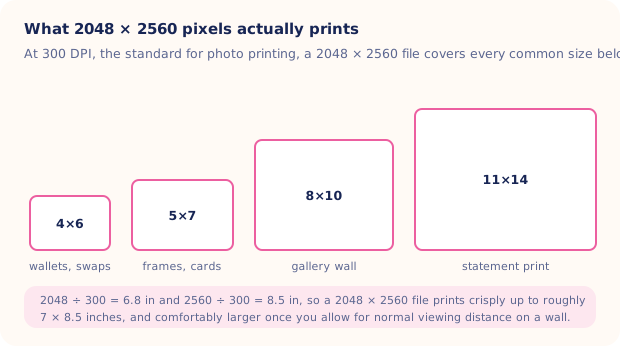
An 11×14 has more than four times the area of a 5×7, and it shows four times as much of any softness or camera shake in the original. The boxes in the diagram are drawn to scale against each other, so they are worth a look before ordering anything large.
What 2048×2560 actually gives you
| Print size | Pixels for a full 300 DPI | What a 2048×2560 file does |
|---|---|---|
| 4×6 | 1200 × 1800 | More than enough. Crops the most, since 4:6 is a narrower shape |
| 5×7 | 1500 × 2100 | Comfortably above the standard, with a small crop off the sides |
| 8×10 | 2400 × 3000 | Slightly under 300 DPI, and indistinguishable in a frame. The perfect shape match |
| 11×14 | 3300 × 4200 | Around 185 DPI. Fine on a wall you view from a meter away, soft up close |
Note the shape column matters as much as the pixel column. A 2048×2560 file is a 4:5 rectangle, which is exactly 8×10, so nothing gets trimmed at that size. Every other size crops something. Leave a little space above the head and around the sides when you shoot, and the lab's automatic crop will never take an ear.
Two habits that quietly wreck resolution
- Sending photos through messaging apps. Most compress hard. Always print from the original file, or from a properly exported copy.
- Cropping tight in the phone gallery. A 50% crop halves your printable size. Crop at the lab's ordering stage instead, where the full file is still available.
Should you print baby photos on matte, lustre or glossy?
Paper changes a photograph more than most people expect, and newborn skin is the hardest test of it. Skin in the first weeks is often blotchy, peeling or slightly red, and glossy paper amplifies every bit of that texture while adding reflections that make a framed print unreadable from half the room.
- Lustre (also sold as satin or pearl). The default for baby portraits, and what most professional labs deliver as standard. Enough sheen for rich blacks, enough texture to soften skin, and it does not show fingerprints.
- Matte. Quiet and gentle, and the best surface there is for black and white. Blacks look a touch lighter and colors a touch flatter, which is often flattering on a newborn. Best choice for anything going behind glass.
- Glossy. Punchy color and maximum sharpness, at the cost of glare and visible skin texture. Fine for small prints in an album, less so for a framed portrait.
- Fine art or textured stock. Beautiful for one large statement print. Overkill for a set of twelve.
For a nursery gallery wall, order the whole set on the same paper. Mixed finishes across a matching set of frames look like an accident.
Why do prints come back darker than the screen?
Your phone is a backlit screen at full brightness. Paper reflects whatever light is in the room. A print can only ever be as bright as the lamp above it, so shadows that read as detailed on a phone frequently arrive as solid black.
Three checks that take a minute:
- Drop your screen brightness to about 60% before judging an edit. That is much closer to what paper will do.
- Lift the shadows slightly and pull back heavy contrast. Anything that looks moody on screen will look murky on paper.
- Order one 4×6 test print before committing to a set of twelve. It costs pennies and it tells you exactly how your lab handles your files.
Warm and cool casts are the other surprise. Mixed indoor lighting leaves skin half yellow and half blue, and the eye forgives that on screen far more than on paper. Fixing white balance first is one of the basics covered in baby photo editing basics. If the color is beyond rescuing, converting to black and white removes the problem entirely and usually improves the picture.
Where should you print baby photos?
The local pro lab
Best quality, real people, proper paper stock, and someone who will tell you if a file is too small. Slightly more expensive per print and worth it for anything going in a frame or given as a gift.
The pharmacy or supermarket kiosk
Cheap and same-day, which is a genuine advantage when a grandparent is visiting tomorrow. Color accuracy varies by machine and by day. Fine for 4×6 stacks and wallet prints, less reliable for a large portrait.
Online labs
The middle ground, with the widest choice of sizes, papers and framing. Order early, since delivery is the variable. Our post on photo gifts for grandparents has sensible lead times for the holiday rush.
Why print at all
Because digital storage fails in ways paper does not. Accounts lapse, phones get stolen, backups quietly stop running, and file formats drift. None of that touches a print in a shoebox.
Ask anyone who lost a hard drive what they still have from their own childhood. It is always the prints. Nobody has ever opened a drawer and found a photo that stopped working.
There is also the plain fact that a printed photo gets seen. A file gets seen once, on the day it was taken, and then joins several thousand others in a scroll nobody revisits (the camera roll is a very efficient place to lose the things you love most).
Getting a print-worthy file in the first place
Printing exposes everything: soft focus, camera shake, yellow light, a cluttered background you never noticed on a small screen. When the expression is perfect but the setting is not, Totti takes one clear photo of your baby, keeps their real facial features, and regenerates the background, lighting and styling as a studio-style portrait. Export in HD at 2048×2560 and send that file to the lab of your choice.

An HD file the print lab will be happy with
50+ templates, milestone cards with wooden plaques, Polaroid, Vintage, Wood, Gold and Floral frame styles, and export at 2048×2560. Free to download on iPhone and iPad, iOS 17 or later.
Get Totti on the App StoreStart small this week. Order ten 4×6 prints of photos you already love, on lustre paper, from one lab. Seeing them in your hand is the thing that makes people print regularly, and regularly is what eventually turns into an album.